One context. Every agent.
Write it once. Claude, Cursor, and Codex all read the same workspace.
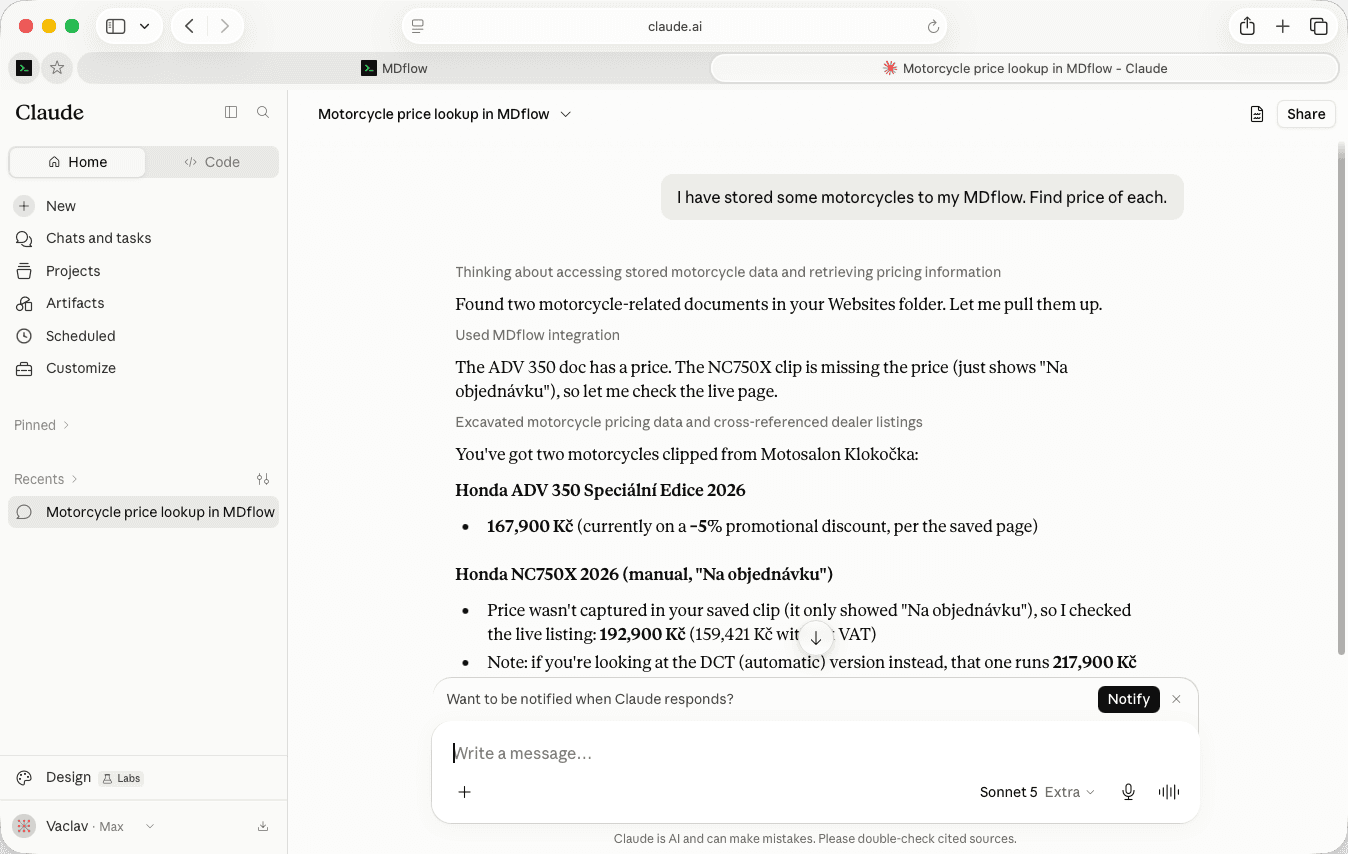
“I paste the same doc into Claude five times a day.”
And again into Cursor when you switch to writing code. And again into Codex. And then you edit the document, and every one of those copies is quietly wrong — but only some of them are in a conversation you will notice.
The per-client memory features do not fix this; they multiply it. Now the same facts live in three vendors' storage, in three formats, none of which you can read, diff or move.
How it works
- 01
Write it in MDflow
The architecture decisions, the house style, the API conventions, the onboarding you explain every week. Ordinary markdown in ordinary folders.
- 02
Connect over MCP
One OAuth click for Claude.ai and the ChatGPT app; a Personal Access Token for Claude Code, Cursor, Codex and the OpenAI API.
- 03
Every client reads it
The same folders, the same documents, the same answers — whichever tool you happen to have open.
Connecting a client
Two paths, depending on whether the client can do OAuth for you or wants to send its own Authorization header.
- Claude.ai — OAuth, no token. Add
https://mdflow.cz/api/mcpas a custom connector and sign in. Nothing to copy, nothing to paste, nothing to rotate by hand. Full guide. - ChatGPT app — OAuth, no token. Paste the same URL and click connect. Full guide.
- Clients that send their own header. Claude Code, Cursor, VS Code and the OpenAI Responses API talk to the same hosted server with a Personal Access Token in an
Authorizationheader. Config blocks below. - Or run it locally. A local stdio server is available for clients that prefer it, including Codex. Same tools, same workspace, no hosted round-trip.
The config blocks
Real and copy-pasteable. Swap mdf_your_token_here for a Personal Access Token from Settings; these are the same blocks as the MCP docs, so there is only ever one right answer.
Claude Code
One command; Claude Code stores the header for you.
claude mcp add --transport http mdflow https://mdflow.cz/api/mcp \
  --header "Authorization: Bearer mdf_your_token_here"
Cursor
In ~/.cursor/mcp.json, or the project's .cursor/mcp.json.
{
  "mcpServers": {
    "mdflow": {
      "url": "https://mdflow.cz/api/mcp",
      "headers": { "Authorization": "Bearer mdf_your_token_here" }
    }
  }
}
Codex
In ~/.codex/config.toml, using the local stdio server.
[mcp_servers.mdflow]
command = "node"
args = ["/absolute/path/to/mdflow-mcp/server.mjs"]
env = { MDFLOW_API_TOKEN = "mdf_your_token_here" }
OpenAI Responses API
The hosted server as a tool in a single API call.
{
  "model": "gpt-5.2",
  "tools": [
    {
      "type": "mcp",
      "server_label": "mdflow",
      "server_url": "https://mdflow.cz/api/mcp",
      "headers": { "Authorization": "Bearer mdf_your_token_here" }
    }
  ],
  "input": "Get information about onboarding from mdflow."
}
Claude Desktop needs the mcp-remote bridge — that block and every other client is on the MCP docs page.
Why retrieval works without a vector database
The unusual part of this setup: there is no embedding pipeline, and that is a feature rather than a shortcut.
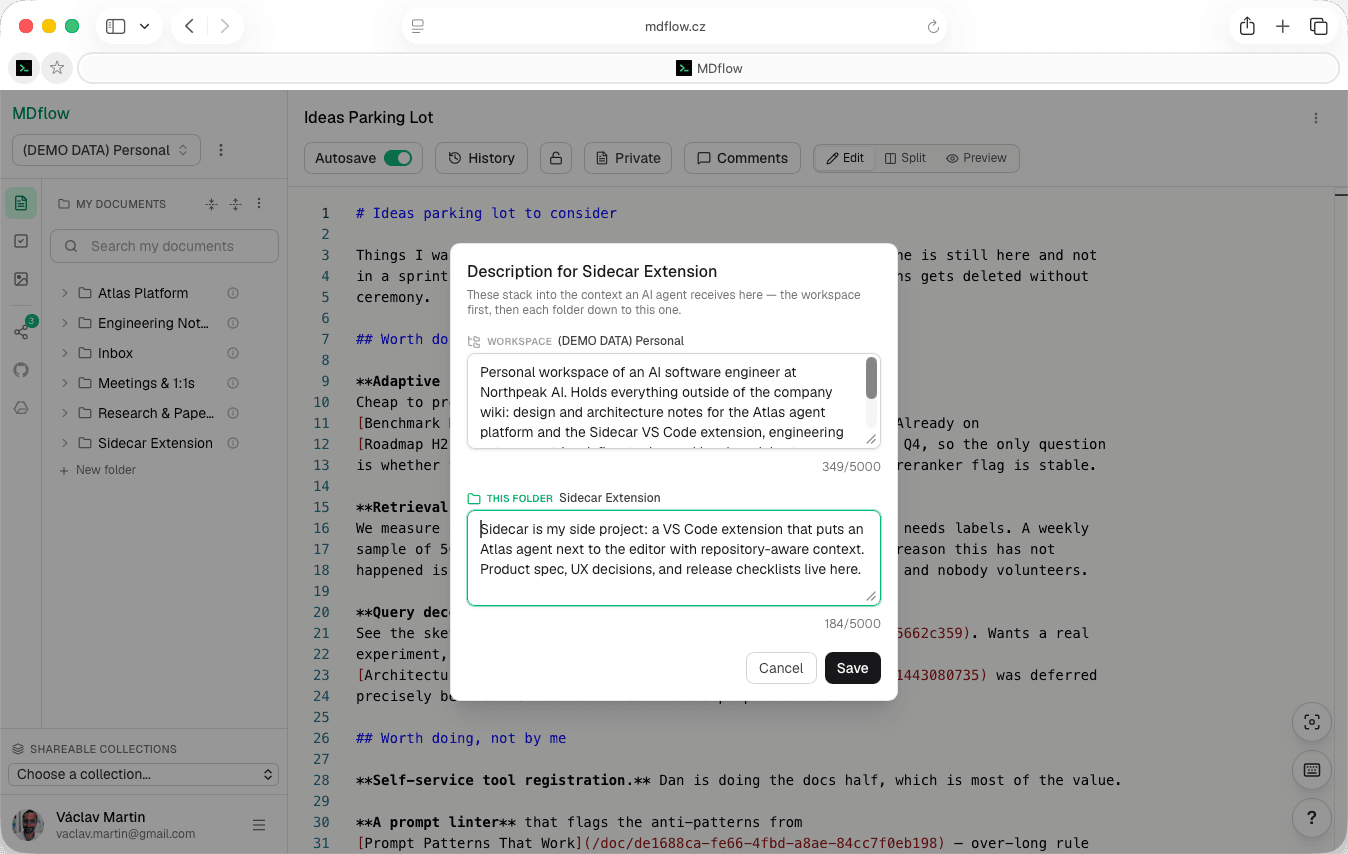
- You describe the folder. Every folder takes a description — one or two sentences saying what belongs in it. That is the whole configuration step.
- Descriptions outrank names.
mdflow_get_contextranks folder descriptions above folder names and document titles, then returns the best-matching markdown bodies. A folder calledMiscwith a good description still gets found. - Scope it, or don't. Pass a
workspaceIdto keep retrieval inside one workspace when the topic clearly belongs there; omit it for broad questions that might span several. - No embeddings to maintain. Nothing to index, nothing to re-embed after an edit, no chunk size to tune, no similarity threshold that mysteriously stops working. You wrote the description; you can read it and fix it.
Switching agents costs nothing
This is the argument. Everything above is mechanism; this is the reason to bother.
A model you prefer ships next quarter. A client gets a feature the other one does not have. Your employer standardises on something else. In every one of those cases the question is the same: how much of what your assistant knows about your work is trapped in it?
With the context in a markdown workspace, the answer is none. You add a config block and the new client knows what the old one knew. The documents are yours in a format that predates all of these tools and will outlast several of them — and you can export the whole workspace as a .zip any time you want to leave MDflow too.
What it doesn't do
Worth knowing before you build a workflow on this:
- The API and MCP require Pro. €4.99/mo. Everything in the browser stays free — it is programmatic access that is gated, and there is no free tier of it.
- Encrypted documents are unreadable to agents. The server holds ciphertext only, so your own assistants cannot read them either.
- Retrieval is only as good as your descriptions. An empty folder description means the folder ranks on its name alone. This rewards a little curation.
- Rate limited. 60 requests per minute. Fine for interactive use; something to design around for a bulk job.
Questions
Which AI clients can read an MDflow workspace?
Do I need a vector database?
What happens when I switch from Cursor to Claude Code?
Is this Pro-only?
Can agents write, or only read?
Can an agent read my encrypted documents?
Related
- Let agents maintain a knowledgebaseThe other direction — the agent writes and files, and you keep an audit trail of every write.
- Markdown for AI agentsWhy markdown is the right format for this at all, and the discovery surfaces agents use to find MDflow.
- MCP setup guideA longer walkthrough for Cursor, Claude Desktop and Codex, step by step.
Write it once. Read it everywhere.
Put the context your assistants keep asking for into a folder, describe the folder, and connect the clients you already use. The next one you try starts out knowing everything.
Free to write and organise. The MCP server and HTTP API need Pro, from €4.99/mo.