Automate MDflow with n8n.
verified community node · n8n Cloud · ProWire your markdown workspace into n8n — the fair-code workflow automation tool with 500+ integrations. The n8n-nodes-mdflow community node lets a workflow create, update, move, and share MDflow documents, manage folders and workspaces, and react the moment new content appears — no glue code, no bespoke API client.
The package ships two nodes:
- ›MDflow — an action node with 22 operations across Documents, Folders, Workspaces, and Shares.
- ›MDflow Trigger — starts a workflow when a new document, folder, or workspace appears.
n8n-nodes-mdflow has passed n8n's community-node verification and is published on n8n Cloud. Search for MDflow in the nodes panel and drag it onto the canvas — no manual install, no npm command.The node is free and open source (MIT). It talks to MDflow through the authenticated HTTP API, which is a Pro feature — so the MDflow account you connect needs MDflow Pro.
The MDflow node on your canvas
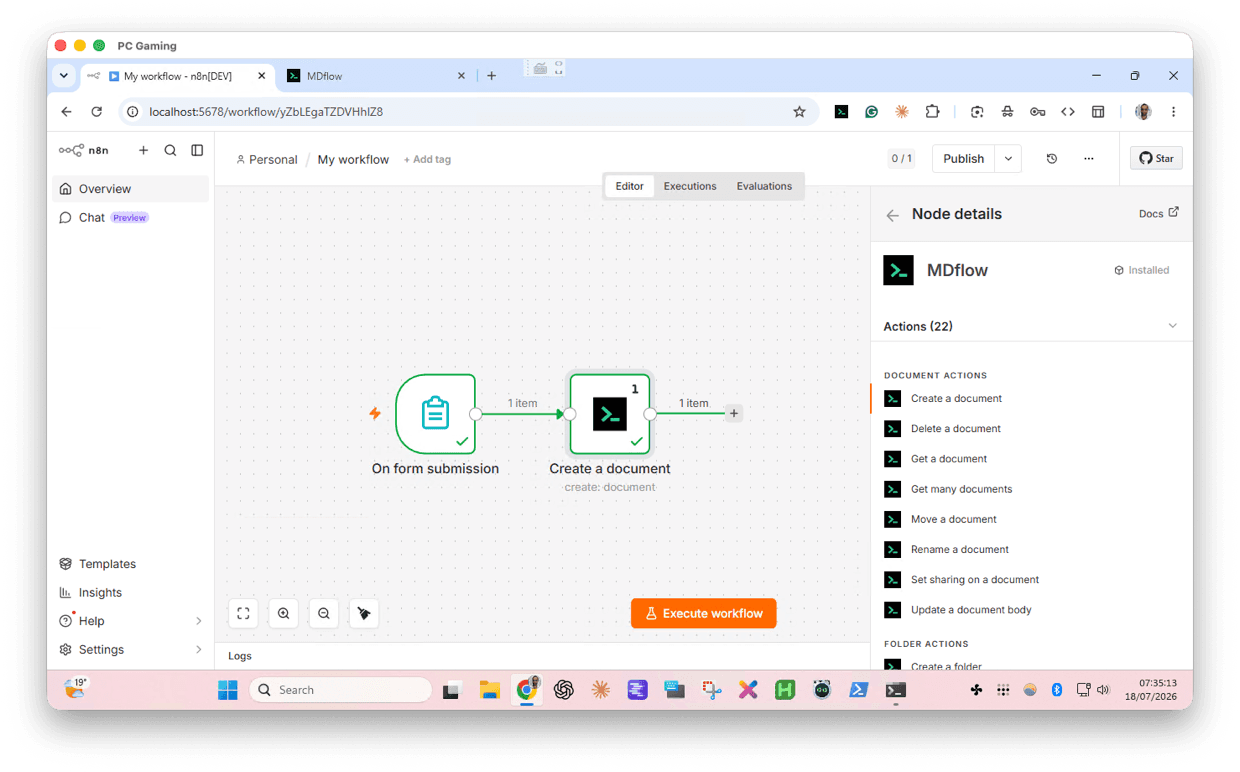
Two nodes, one workspace
The action node exposes the whole MDflow object model as ordinary n8n operations — pick a resource, then an operation, and map your workflow data onto the fields.
| Field | What to enter |
|---|---|
| Document | Create · Delete · Get · Get Many · Move · Rename · Set Sharing · Update Body |
| Folder | Create · Delete · Get · Get Documents · Get Many · Update |
| Workspace | Create · Delete · Get Many · Update |
| Share | Add · Get Many · Remove · Remove All |
The MDflow Trigger node polls for new content, so a workflow can fire the instant something is created:
- ›New Document — watches a folder.
- ›New Folder — watches an optional workspace, or the whole account.
- ›New Workspace — watches the whole account.
Why connect MDflow to n8n?
- ›500+ integrations, no code. Everything n8n already connects to — forms, databases, GitHub, CRMs, Slack, email, RSS, webhooks — can now read from and write to your markdown workspace.
- ›Two-way, not just a sink. The node has full read and write access: pull a document's body into a workflow, transform it, and write it straight back.
- ›Event-driven. The trigger node turns “a new document landed” into the start of an automation — index it, back it up, notify a channel, kick off a review.
- ›A workspace your AI agents use. The MDflow node works as a tool for n8n AI Agents, so an agent can manage the same markdown your team edits on the web.
- ›One account, every surface. The documents you automate here are the same ones you reach on the web, on mobile, in the VS Code extension, and over the MCP server.
Install the node and connect
Add the node from the canvas
Because the node is verified, it is offered inside n8n itself. Open the nodes panel on the canvas with + or N, type MDflow, and look under More from the community. Selecting it shows every action it supports; Install makes it available to everyone on the instance.
Not seeing it? Verified community nodes can be switched off per instance — on n8n Cloud the toggle is in the Admin Panel, and self-hosted instances control it with the N8N_VERIFIED_PACKAGES_ENABLED environment variable. A restart may be needed before a newly enabled instance lists it. Only an instance owner or admin can install nodes.
You can still install it by package name instead — on a self-hosted instance, from Settings → Community Nodes → Install or from the command line into your n8n data folder.
n8n-nodes-mdflown8n's own guides cover installing verified community nodes and installing by package name. The package lives on npm and its source is on GitHub.
Create an MDflow API credential
The node authenticates with a Personal Access Token. In n8n, add a new MDflow API credential and paste the token in.
| Field | What to enter |
|---|---|
| Personal Access Token | Create a token (mdf_…) at mdflow.cz/settings and paste it into the credential. Token creation and API access require MDflow Pro. |
Pro plan required until the account is upgraded to Pro (€4.99/month, 7-day free trial).Build your first workflow
Drop the MDflow node onto the canvas, choose a resource and operation — say Document → Create — pick the target folder, map your body text, and run it. Reach for the MDflow Trigger node instead when you want the workflow to start from new MDflow content.
What you can build
- ›Capture forms as markdown. An n8n form or a webhook submission becomes a formatted document in the right folder — the exact flow shown above.
- ›Build a knowledge base on a schedule. Pull from GitHub issues, a database, RSS, or a CRM, render the result as markdown, and create or update documents so your workspace stays an up-to-date, agent-readable source of truth.
- ›Publish and announce automatically. Create a document, use
Set Sharingto publish it at a link, then post that link to Slack, Discord, or email in the same run. - ›React to new content. Let MDflow Trigger fire on a new document to back it up, index it elsewhere, or notify a reviewer.
- ›Send scheduled digests. A cron trigger gathers the day's data, writes a markdown report into MDflow, and shares the rendered page — a standing daily brief with no manual step.
Give n8n AI Agents a workspace
MDflow is built for people and AI agents, and n8n is where the two meet. There are two ways to put your markdown in front of an agent:
- ›As an AI Agent tool. Connect the MDflow node to an n8n AI Agent node's tool input and the agent can create, read, update, and share documents as part of its reasoning.
- ›Over the remote MCP server. For free-form access, point n8n's MCP Client Tool node at MDflow's hosted server —
https://mdflow.cz/api/mcp— and the agent gets the full MCP toolset, includingmdflow_get_contextretrieval ranked by folder descriptions.
Notes & limits
- ›Update Body replaces the whole body. To append instead,
Getthe document first and concatenate in an expression before theUpdate Bodyoperation. - ›Size limits. Document bodies are capped at 500 KiB and folder descriptions at 5,000 characters — the same limits as everywhere else in MDflow.
- ›Duplicate names are auto-suffixed. The server disambiguates duplicate document titles and folder names with a numeric suffix and returns the final name.
- ›Triggers poll. The trigger node checks for new content on n8n's schedule rather than receiving a push, so expect it to fire within a polling interval, not instantly.