Clip the web. Keep the markdown.
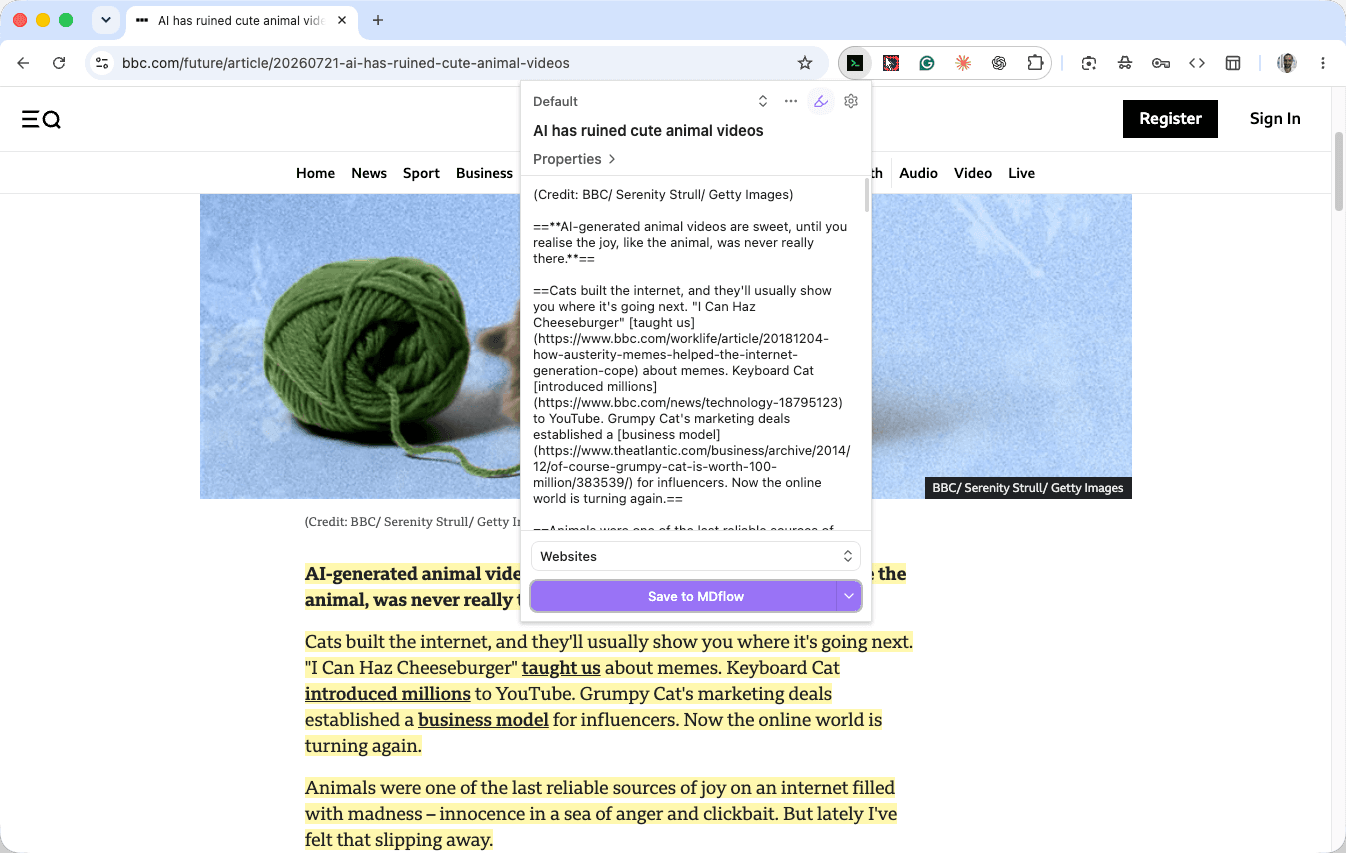
The MDflow Web Clipper turns any web page into clean Markdown and saves it straight to a folder in your workspace. Highlight what matters, then clip — no copy-paste, no formatting cleanup. It works like the Obsidian Web Clipper, but your notes live in your MDflow account: reachable from any device, your scripts, and your AI agents.
Three steps to your first clip
Install the extension
Add the MDflow Web Clipper to Chrome, Firefox or Safari — it's a free download from the official store.
Connect once
Paste a Personal Access Token (mdf_…) from your MDflow settings. This links the extension to your account and is part of MDflow Pro.
Clip anything
Open any page, optionally highlight, pick a folder, and save. Every clip becomes a new Markdown document in your workspace.
What people clip the web for
The same workflows that made web clippers part of every note-taker's toolkit — pointed at your MDflow workspace.
Read it later, minus the clutter
- Clip long articles into clean Markdown — navigation, ads and pop-ups stripped out
- Read in a calm document instead of a tab you'll never reopen
- Replaces a read-it-later service, but the saved copy is plain Markdown you own
Highlight first, clip what matters
- Highlight passages as a first pass while you read — they persist across visits
- Then clip only your highlights instead of the whole page
- Keeps your workspace lean rather than a pile of unread full-page dumps
Build a research & reference library
- Send papers, docs and sources into a project or inbox folder
- Typed frontmatter properties capture author, source URL and date automatically
- Everything is full-text searchable inside your workspace afterwards
A template per kind of page
- Separate templates for articles, recipes, videos, threads or product pages
- Auto-selected by URL pattern or the page's schema.org data
- Each template sets the name, folder, content and properties for that source
Let an LLM do the busywork
- Natural-language prompts summarize, pull quotes, or extract tags as you clip
- Bring your own provider and key — Claude, OpenAI, Gemini and more
- Requests go straight to your provider; MDflow never sees or stores them
A second brain your agents can read
- Every clip lands in your cloud workspace as durable Markdown
- The same documents are reachable over the MDflow HTTP API and MCP servers
- So Claude, Cursor or Codex can answer from the web research you captured
// Capture the web by hand; let your agents read it back as context.
The engine behind the clips
A full-featured clipper — capture, highlight, template and AI — not a bookmark button.
Capture any page, your way
- Clip the full article, a text selection, or your saved highlights
- Edit the name and add notes; pick the destination folder live from your workspace
- Trigger from a popup, side panel, in-page clipper, right-click menu or keyboard shortcut
- Chrome, Brave, Edge and Arc; Firefox on desktop and mobile; Safari on macOS, iOS and iPadOS
A real web highlighter
- Highlight text, individual elements or whole pages — saved across visits
- Keep highlights inline in the clip, replace the content with them, or save without
- Manage everything in a dedicated view with search, sorting, undo and redo
- Delete highlights by page, by domain, or all at once; export to a file
Templates, properties & AI
- Multiple templates with conditionals, loops, variables and inline validation
- Typed frontmatter properties: text, list, number, checkbox, date and date-time
- Preset, meta, CSS-selector and schema.org variables, plus a large filter library
- Optional AI interpreter with your own provider key and a live token counter
// Import, export and copy templates and property sets between machines.
Why clip to MDflow instead of a local vault
A local-vault clipper saves to one machine. MDflow saves to your account — which changes what your clips can do afterwards.
- Not tied to one machine. Clip on your phone in Safari, open it on your laptop. Your clips follow your account, not a folder on one computer.
- Readable by your agents. The same Markdown is reachable over the MDflow HTTP API and MCP servers, so Claude, Cursor or Codex can answer from it.
- One token, one workspace. The clipper authenticates with the same Personal Access Token as the rest of MDflow — your scripts, API calls and clips share a workspace.
- Private by design. AI requests go straight to your provider with your key; MDflow stores nothing of them. The clipper only touches http/https pages and always creates a new document.
The clip lands in a folder. Your agents read folders.
This is the part that makes clipping worth doing. A saved article is not an archive entry — it is a markdown document in a folder you described, which means every tool already pointed at that folder picks it up without you doing anything else.
You clip
An article, a spec, a changelog, a competitor's pricing page. Pick the destination folder in the clipper.
It becomes a document
Clean markdown with your template's frontmatter, filed where you told it to go — alongside the notes you wrote by hand.
Your agents can answer from it
Claude, Cursor or Codex connected over MCP now read your research too. No re-pasting, no second index.
Already use the Obsidian Web Clipper?
You'll feel at home. The highlighter, multiple templates, schema.org variables, typed properties and the optional bring-your-own-key AI interpreter all work the way you expect — the clips just land in your MDflow workspace instead of a local vault, ready for any device and your AI agents.
Add it to your browser
Install from the official store, then paste a Personal Access Token to connect it to your workspace.
// Safari is supported on macOS, iOS and iPadOS through the App Store.
The clipper connects on Pro
The extension is free to install. Saving clips uses a Personal Access Token, which is part of MDflow Pro — and Pro starts with a 7-day free trial, no card to start.
- [x]100 markdown files
- [x]5 image uploads
- [x]Public sharing links
- [x]Commenting
- [x]10,000 markdown files
- [x]10,000 image uploads
- [x]Full HTTP API access
- [x]Remote MCP server
Questions about the clipper
How do I connect the clipper to my workspace?
Is the Web Clipper free?
How is it different from the Obsidian Web Clipper?
Where do my clips end up?
Can I clip only part of a page?
Does MDflow see my data or my AI requests?
Which browsers are supported?
Start clipping the web into markdown.
Create a free MDflow account, install the extension, and save your first page in under a minute.