A knowledgebase out of documents you already have
Group, publish, search. No build step, no static site generator.
“Publishing internal docs means standing up a whole site.”
The documents exist. They are written, they are correct, and they are sitting in a folder. What stands between them and a link you can send is a static site generator, a theme, a config file, a build, a repository and somewhere to deploy it — and then the same again every time someone edits a paragraph.
A collection skips all of it. You choose which documents belong together and turn sharing on. The published knowledge base reads from the same documents you edit, so there is never a build to remember or a deploy that is out of date.
Three steps, no toolchain
- 01
Group
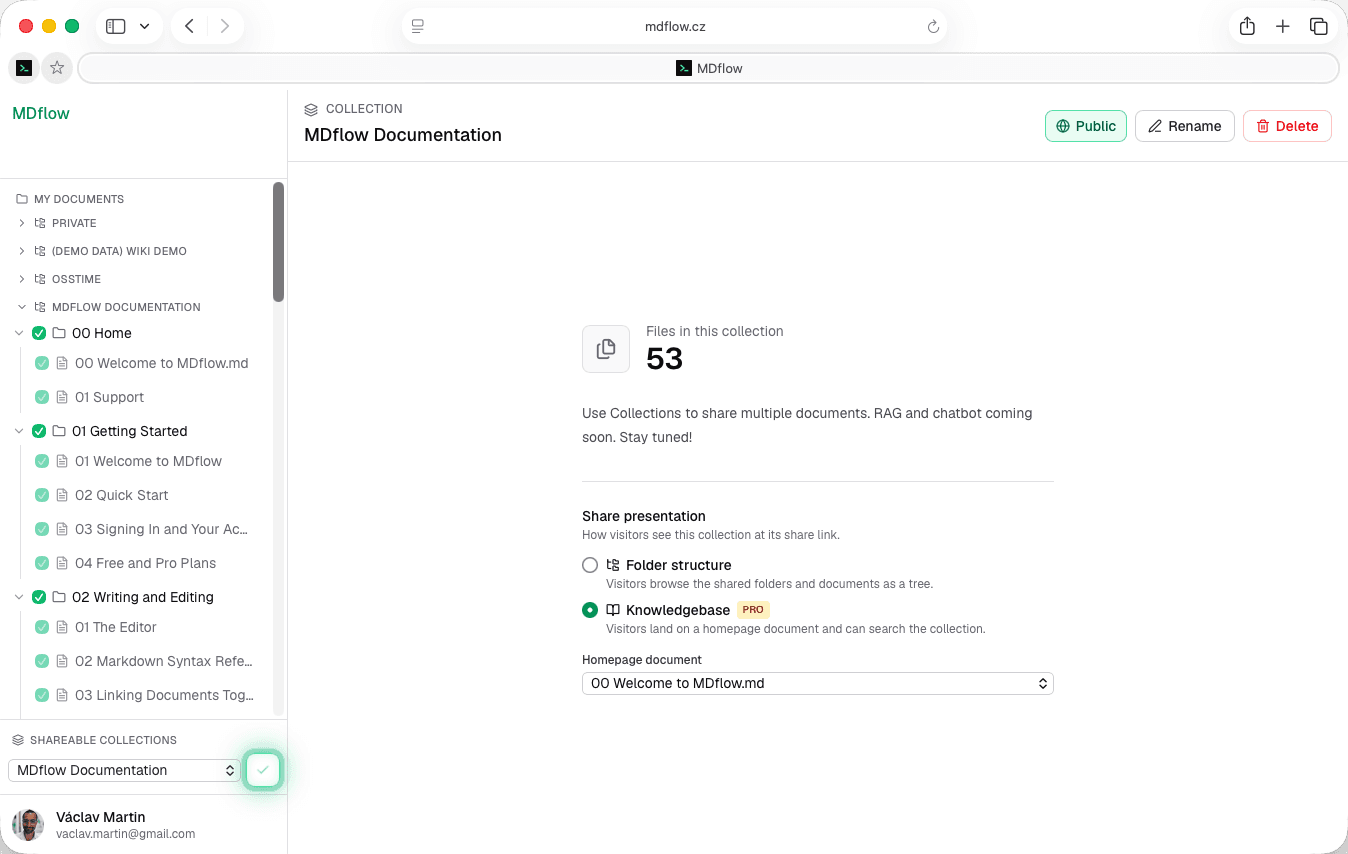
Make a collection and add documents, or whole folders in one go. Pull from any workspace — collections are deliberately cross-workspace.
- 02
Pick a homepage
In Knowledgebase mode, one document renders at the share root, and the sidebar gains a Home entry pointing back at it.
- 03
Publish
A public link anyone can open, or a private invite by email. Either way there is nothing to build and nothing to deploy.
Collections: a reading set, not a move
A collection groups documents for readers without disturbing how you file them for yourself.
- Documents or whole folders. Add a single document, or add a folder and every document inside it comes along. Nothing is moved and nothing is copied — the collection is a view over documents that stay where they are.
- Across every workspace. When you build a collection you pick from all of your workspaces at once, grouped by workspace. Search and the sidebar are scoped to one workspace; collections are not.
- One document, several collections. The same onboarding note can sit in the customer knowledge base and the internal handbook without being duplicated. Edit it once and both update.
- Filed how you like, published how they need. Your folder tree is organised for writing. A collection is organised for reading. They do not have to agree.
Knowledgebase mode
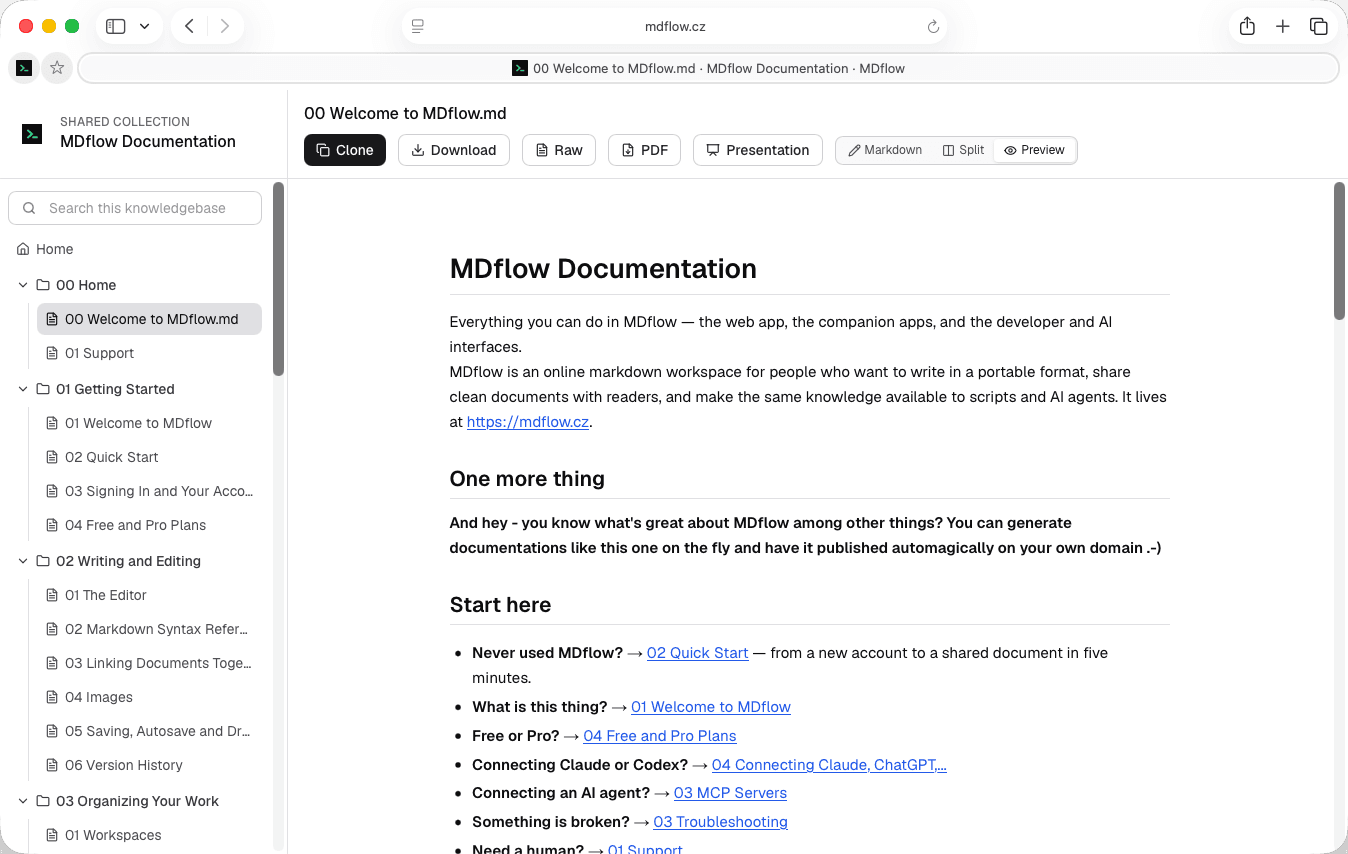
A collection share renders one of two ways: the folder structure, or Knowledgebase. Knowledgebase is the one that reads like a documentation site.
- A homepage at the root. Pick any document in the collection and it renders directly at the share link's root URL — so the link you send lands on an introduction, not a file list.
- A Home entry in the sidebar. Readers can always get back to the homepage from anywhere in the knowledge base.
- Search for visitors. Full-text search across the collection's documents, run by the reader without an account.
- Both share modes. Knowledgebase presentation applies to the public link and the private email-ACL view alike — the same reading experience either way.
Search that behaves for readers
Visitor search is deliberately forgiving, because the person searching does not know your vocabulary yet.
- Language-neutral. No stemming dictionary to pick and no language to configure. It behaves the same whether the knowledge base is in English, Czech or German.
- Diacritics-insensitive. Typing
ucetnictvifindsúčetnictví. Readers should not have to reproduce your accents to find a page. - Prefix-matching. Typing
privatefindsprivately, so partial words still land. You do not need to guess the exact form of the word. - Encrypted documents are never searchable. The server holds only ciphertext for those, so there is nothing to index. That is a property of client-side encryption, not a setting.
Publishing: to everyone, or to eight people
The same knowledge base, two audiences. Both modes render identically; only who can open the link changes.
- A public link. Read-only, openable without an account, on a long random URL designed to be hard to guess. Turning sharing off invalidates it permanently; turning it back on mints a fresh one.
- Private by email. Invite specific addresses instead. Recipients sign in with the invited email, see it under “Shared with me”, and you can revoke one person or everyone at once, immediately. Pro.
- Your own domain. Connect one custom domain in Settings and share links are offered on it, with the permanent mdflow.cz URL still available so nothing you already sent breaks. Pro.
- Comments, if you want them. Optional per share. Readers comment on a selected passage and you moderate from your normal editor.
What the reader actually gets
A clean reader with your documents in it and none of your workspace around it.
- A file list they can navigate. The collection's documents in a sidebar, opened in a clean reader with none of your workspace around it.
- Three ways to read. Rendered preview by default, read-only markdown source, or a side-by-side split on larger screens.
- Take a copy. Download any document as its original
.md, or run it through a print-ready PDF flow. - No account, no install. Public knowledge bases open for anyone with the link. Signing in is only needed to comment or to clone a private copy.
What it doesn't do
A collection is a flat reading set. That keeps it quick to assemble and quick to reason about, and it does mean these are missing:
- No nested collections. A collection cannot contain another collection. Adding a folder brings its documents in, but the published structure stays one level deep.
- No custom theming. You get the MDflow reader — your own domain, but not your own CSS.
- No per-page access control. Sharing is set at the collection level; you cannot open one document to the public and keep its neighbour private inside the same share.
- Knowledgebase mode needs Pro. Without it, a shared collection still works — it just presents as the folder tree, with your settings kept for later.
Questions
Is this a static site generator?
What is the difference between a folder and a collection?
Do I need Pro for a knowledge base?
What happens to my knowledge base if Pro lapses?
Can I publish it on my own domain?
Can an AI agent keep the knowledge base up to date?
Related
- Share documents with othersPublic links, private email invites, comments and clones — for one document rather than a set.
- Let agents maintain a knowledgebaseHand the filing to an agent and keep an audit trail of every automated write.
- NotesThe editor, folder tree and search the documents come from in the first place.
The docs are written. Send the link.
Group what belongs together, choose a homepage, turn sharing on. Editing a document updates the published knowledge base straight away — there is no build to run.
Collections and public sharing are on every plan. Knowledgebase mode, private email sharing and custom domains are Pro, from €4.99/mo.