Send a document, not a vault
A clean link anyone can open. No account, no install, no repo access.
“Sharing markdown means emailing a file or granting repo access.”
The document is finished and one person needs to read it. Your options are an attachment they have to open in something, a paste into chat that mangles the formatting, or adding them to a repository so they can read one file — and now they have access to forty others.
None of those is “here, read this.” A share link is: one document, rendered, at a URL, for exactly as long as you want it to be.
Public links
One toggle, one URL, and anyone who has it can read the document in a browser.
- One toggle per document. Sharing is per document, not per workspace. Turning it on generates a read-only link and gives you a one-click copy.
- Hard to guess. The URL is long and random by design. It is unlisted rather than secret — anyone with the link can read it, and search engines are asked not to index share pages.
- Off means off. Turning sharing off permanently invalidates that link. Turning it back on mints a fresh one, so a link you circulated once cannot be quietly reactivated.
- Images come along. Uploaded images referenced by the saved public document become readable through the link. Ones you have not referenced stay private.
- Attached files do not. Files attached to a document are never exposed by a public link: they are not listed on the page, and a link to one is inert for an anonymous reader. Attachments travel only through a private share.
Private, by email
When it should not be openable by whoever ends up with the link.
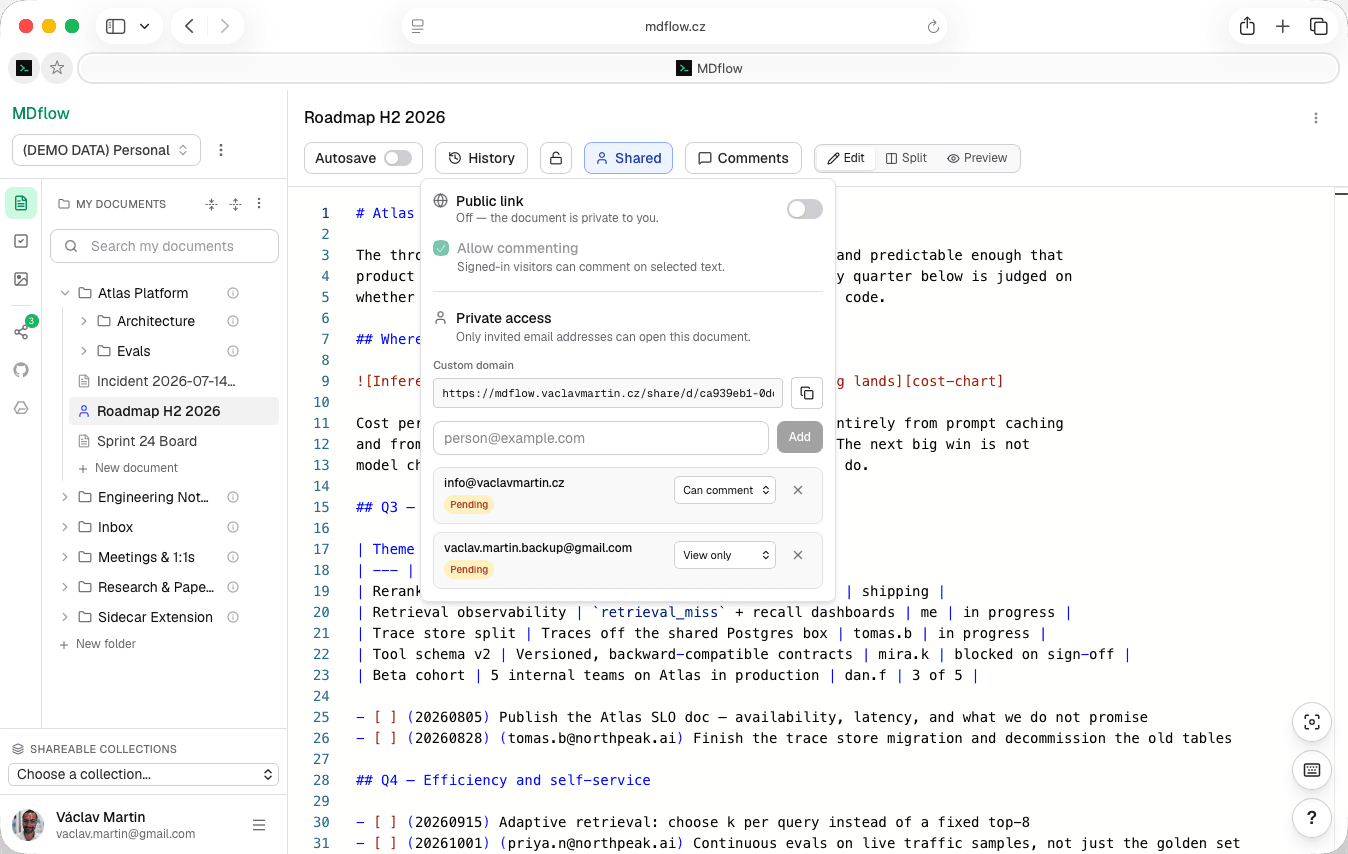
- Specific addresses. Invite people by email instead of minting a public link. Recipients open a private link and sign in with the invited address to read it.
- View, or view and comment. Chosen per person, not per document.
- Pending vs accepted. Every share shows its state — it becomes accepted the first time the recipient signs in — so you can tell who has actually opened it.
- Attached files, while the text links them. A recipient can download the files the saved document body links to — the PDF or spreadsheet the note is about. Remove a link and save, and that file goes out of reach for them again; every download is authorized on the spot through a short-lived link, never a public URL.
- Revoke one, or everyone. Immediately, from the same panel. Shared items appear under “Shared with me” in the recipient's sidebar until you do. Pro.
What the reader gets
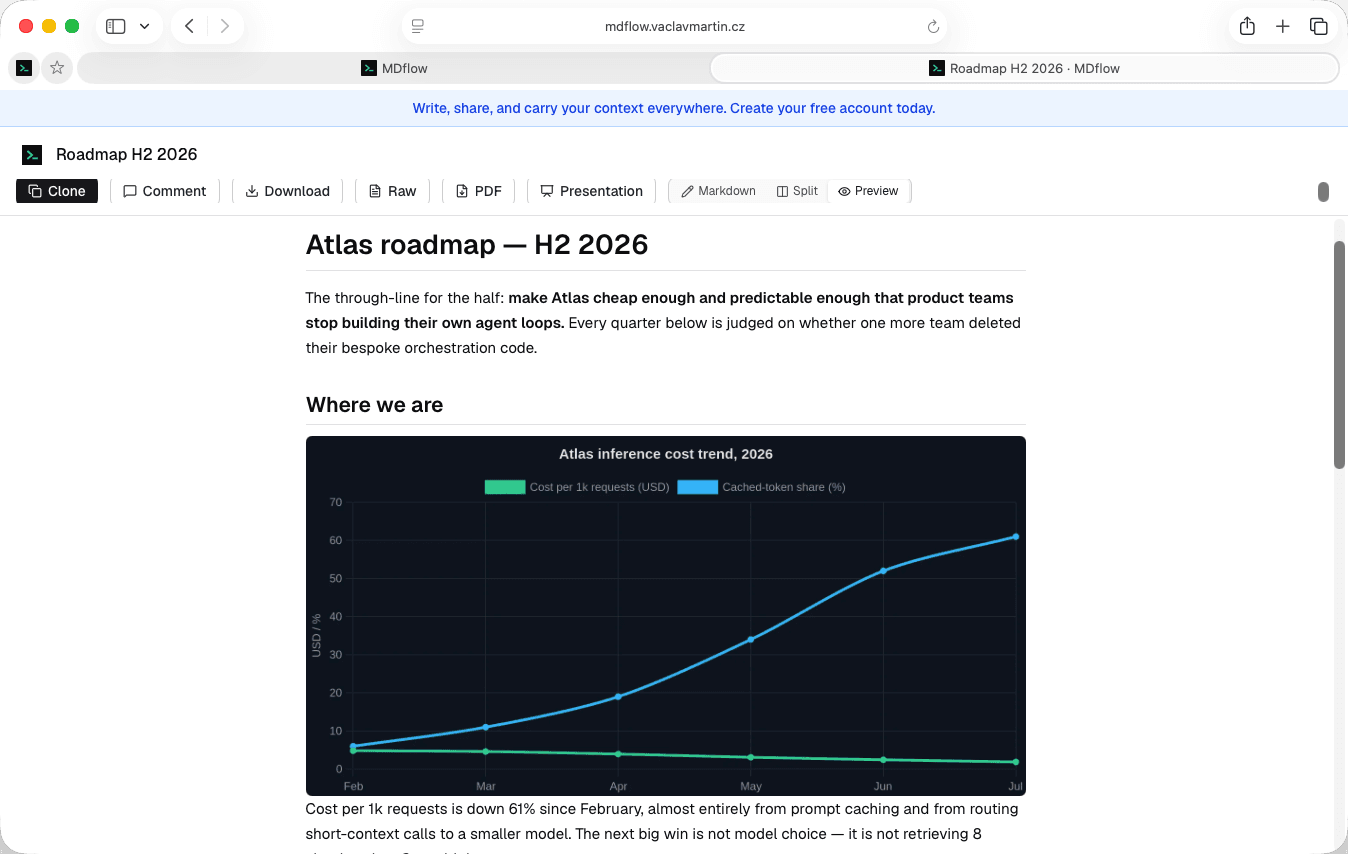
A clean reader with your document in it. No sidebar of your folders, no sign-up wall, no cookie banner theatre.
- Three ways to read. Rendered preview by default, read-only markdown source, or side-by-side split on larger screens.
- Take it with them. Download the original
.md— the source, not a conversion — or run it through a print-ready PDF flow. - A Present button. Any reader can present the document as a fullscreen slideshow, split at each top-level heading, without an account.
- No account to read. Signing in is only needed to comment or to clone a copy — and after signing in the reader returns to the same page with that action resumed.
Comments, anchored to the text
Optional per document. When it is on, feedback lands on a specific passage instead of arriving as a separate email that says 'the second paragraph'.
- Anchored to a passage. Readers select text in the markdown source and comment on it. Commented passages are highlighted inline, so feedback points at something specific.
- Panel or drawer. A side panel on desktop, a slide-over drawer on smaller screens. Each comment shows its quoted passage, the author's name and avatar, and a relative timestamp; clicking one jumps to its highlight.
- You moderate from the editor. The owner reads and deletes any comment from the normal workspace editor. Commenters can delete their own.
- They survive. Comments are preserved when sharing is turned off and shown again when it returns. A comment whose text was edited away stays as an orphaned note rather than a stale highlight.
Cloning, and what stays yours
Two things people usually want to check before they turn sharing on.
- They can take a copy. A signed-in reader can clone an independent private copy into their own workspace — choosing the destination folder, with referenced images copied too, and the filename disambiguated if it collides.
- The copy is genuinely separate. Your later edits, unsharing or deletion do not affect it, and nothing they do affects your original.
- Your identity stays private. Shared pages do not show your name or email address. An invalid or disabled link gets a friendly unavailable page, not a hint about what used to be there.
- Your workspace stays private. One document is shared. The rest of the tree — including documents in the same folder — is untouched.
What it doesn't do
Sharing is deliberately simple. The things it does not do:
- No custom share URLs. The slug is random and not editable. You can put it on your own domain on Pro, but not choose the path.
- No real-time co-editing. Readers read and comment; they do not type in your document. Two people cannot edit at once.
- No comment replies or approvals. Comments are a flat list anchored to passages — no threads, no resolve, no approval workflow.
- Private sharing needs Pro. Public links and commenting are free on every plan; email-invited shares and custom domains are Pro.
Questions
Does the person I share with need an MDflow account?
Can they see the rest of my workspace?
Are shared documents indexed by Google?
What is cloning, and does it affect my original?
Can I share on my own domain?
Can I share a whole set of documents rather than one?
One document. One link.
Turn sharing on, copy the URL, send it. The reader gets a rendered page they can read, download, print or present — and nothing else of yours.
Public links and comments are free on every plan. Private email shares and custom domains are Pro, from €4.99/mo.