Your markdown has an endpoint
Webhooks in, documents out, share links on the way back.
“My workflow produces text and there's nowhere good to put it.”
The automation works. It gathers the right things and formats them sensibly. Then it has to go somewhere — so it becomes a Slack message nobody can find in a fortnight, a row in a spreadsheet with a 400-word cell, or an email to yourself.
What that output actually wants to be is a document: readable, filed, searchable, linkable, and editable afterwards by a human who spots something wrong.
Three that earn their keep
Each of these is a handful of nodes, or a handful of lines of curl.
A submission becomes a document
A form post, a Typeform response, an alert from monitoring. The workflow shapes it into markdown and files it in a dated folder, so what arrives is readable a year later rather than a row in a table nobody opens.
Webhook → Set → MDflow: Document / CreateA nightly job assembles a digest
Pull yesterday's merged pull requests, new CRM deals or a feed, render one markdown summary, and write it into the same document each night. Because Update Body replaces the whole body, today's digest is the document — no appending forever.
Schedule → GitHub / HTTP / RSS → Code → MDflow: Document / Update BodyPublish and announce in one run
Write the document, turn public sharing on, take the returned link and post it. The people who need to read it get a rendered page rather than an attachment.
MDflow: Document / Create → Document / Set Sharing → Slack / EmailTwo ways in
A node if you live on the n8n canvas, an HTTP call if you do not. Both hit the same API and obey the same rules.
- The n8n community node.
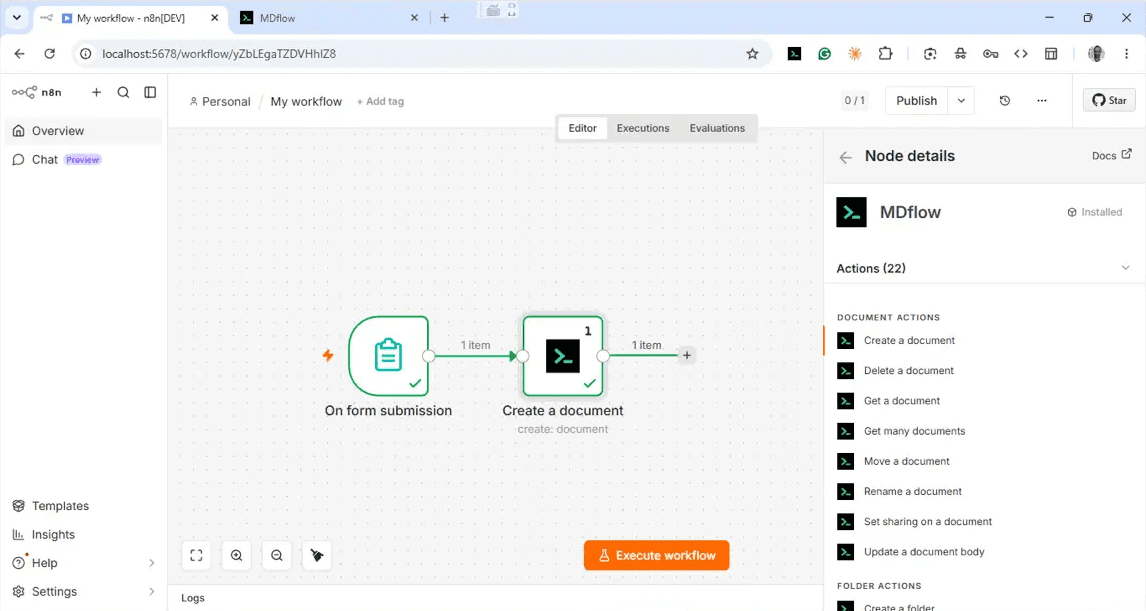
n8n-nodes-mdflow, verified by n8n and published on n8n Cloud — search for it in the canvas nodes panel and install it there, or by package name on a self-hosted instance. Free and open source (MIT). Two nodes: an action node with 22 operations and a polling trigger. - Every object, on the canvas. Document (Create, Delete, Get, Get Many, Move, Rename, Set Sharing, Update Body) · Folder (Create, Delete, Get, Get Documents, Get Many, Update) · Workspace (Create, Delete, Get Many, Update) · Share (Add, Get Many, Remove, Remove All).
- Or plain curl. A versioned JSON API under
/api/v1with a bearer Personal Access Token. No node, no platform, no dependency — anything that can make an HTTP request can write a document. - Both directions. Pull a document's body into a workflow, transform it, and write it straight back. The workspace is a source as well as a destination.
The whole thing, in curl
curl -X POST https://mdflow.cz/api/v1/documents \
  -H "Authorization: Bearer mdf_your_token_here" \
  -H "Content-Type: application/json" \
  -d '{
    "folderId": "8f1c…",
    "title": "2026-07-24 Support digest.md",
    "body": "# Support digest\n\n- 12 tickets closed\n- 2 escalations open\n"
}'Reacting to change
Automation in the other direction: a new document in the workspace starts a workflow.
- New document in a folder. Clip an article, drop a meeting note, let an agent file a draft — and a workflow picks it up to summarise, translate, notify or index it.
- New folder. In a specific workspace or anywhere in the account. Useful when a folder is how a new project starts.
- New workspace. For onboarding flows that create one per client.
- It polls. The trigger checks on n8n's schedule. MDflow does not send outbound webhooks, so latency is your poll interval, not milliseconds.
The contract
The rules are the same whichever way you call in — the node is a wrapper over the API, not a second implementation with its own behaviour.
- OpenAPI 3.1. A machine-readable spec at /openapi.json, with human documentation at /docs/api. Generate a client, or hand the spec to an agent.
- 60 requests per minute. Per token and per authenticated user. Comfortable for scheduled jobs; something to pace a bulk import around.
- Update Body replaces everything. It is a PUT, not an append. To add to a document, read it, concatenate in the workflow, and write the whole thing back.
- 500 KiB per document. And duplicate titles or folder names are disambiguated automatically with
(2),(3)— a re-run never overwrites the previous run's output by accident. - Empty bodies are refused. Unless the request passes
confirmEmpty: true, so a workflow that produced nothing this time cannot blank yesterday's document. - Every write is logged. Arrivals over the API show in the Document Log as
automated · <token name>, so a misbehaving workflow is easy to spot and its token easy to revoke.
What it doesn't do
Design around these rather than discovering them in production:
- Requires Pro. The API, tokens and the n8n node are all Pro (€4.99/mo). There is no free tier of programmatic access.
- No outbound webhooks. The MDflow Trigger polls. If you need sub-second reaction to a document appearing, this is not that.
- No append operation.
Update Bodyreplaces the whole body — read, concatenate in the workflow, write back. - Tokens reach the whole account. You cannot scope one to a single folder or workspace, so treat a workflow token like any other production credential.
Questions
How do I connect n8n to MDflow?
Can a workflow react when a document appears?
Can an AI agent inside n8n use this?
Do I need n8n at all?
Does automation require Pro?
What happens if my workflow runs twice?
Related
Stop dumping output into Slack. Give it a document.
Issue a Personal Access Token, point one workflow at a folder, and see what it looks like a month later when the output is searchable, linkable and editable.
The API, tokens and the n8n node require Pro, from €4.99/mo.