Let the agent do the filing
It researches, drafts, and files. You stay the editor.
“Every knowledge base rots, because updating it is nobody's job.”
It is not that people are lazy. It is that writing the document is the fifth thing on a list of four, and the person who knows the answer has already moved on to the next problem. So the wiki describes a system that stopped existing in March.
An agent is genuinely good at exactly this part: reading what is there, noticing what changed, drafting the update, and putting it where it belongs. It is much worse at deciding what is true. So give it the filing and keep the judgement.
The loop
- 01
It reads what exists
Before writing anything, the agent pulls the current documents so it is revising your knowledge base rather than inventing a parallel one.
- 02
It drafts and files
New documents go into the folders you defined, named the way the folder description implies. Renames and moves happen as things change.
- 03
You edit
You read the Log, diff what changed, fix what is wrong, and restore anything you would rather not keep.
The folder description is the instruction
There is no separate configuration for what an agent should file where. You describe the folder for humans, and the agent reads the same sentence.
- The description is the instruction. You write what belongs in a folder. The agent reads that when deciding where a new document goes — the same sentence that makes retrieval work is what makes filing work.
- One place to change the rules. Filing going somewhere you did not intend? Edit the description. You are not maintaining a separate prompt that has to stay in sync with a folder structure it cannot see.
- It can reorganise, not just append. Renaming documents and moving them between folders are ordinary operations, so the structure can follow the content instead of calcifying around the first month's guesses.
- Readable by a human at every step. The output is markdown in folders. If the agent stops, gets switched, or turns out to be bad at this, what is left behind is a perfectly ordinary set of documents.
Why you can hand over write access
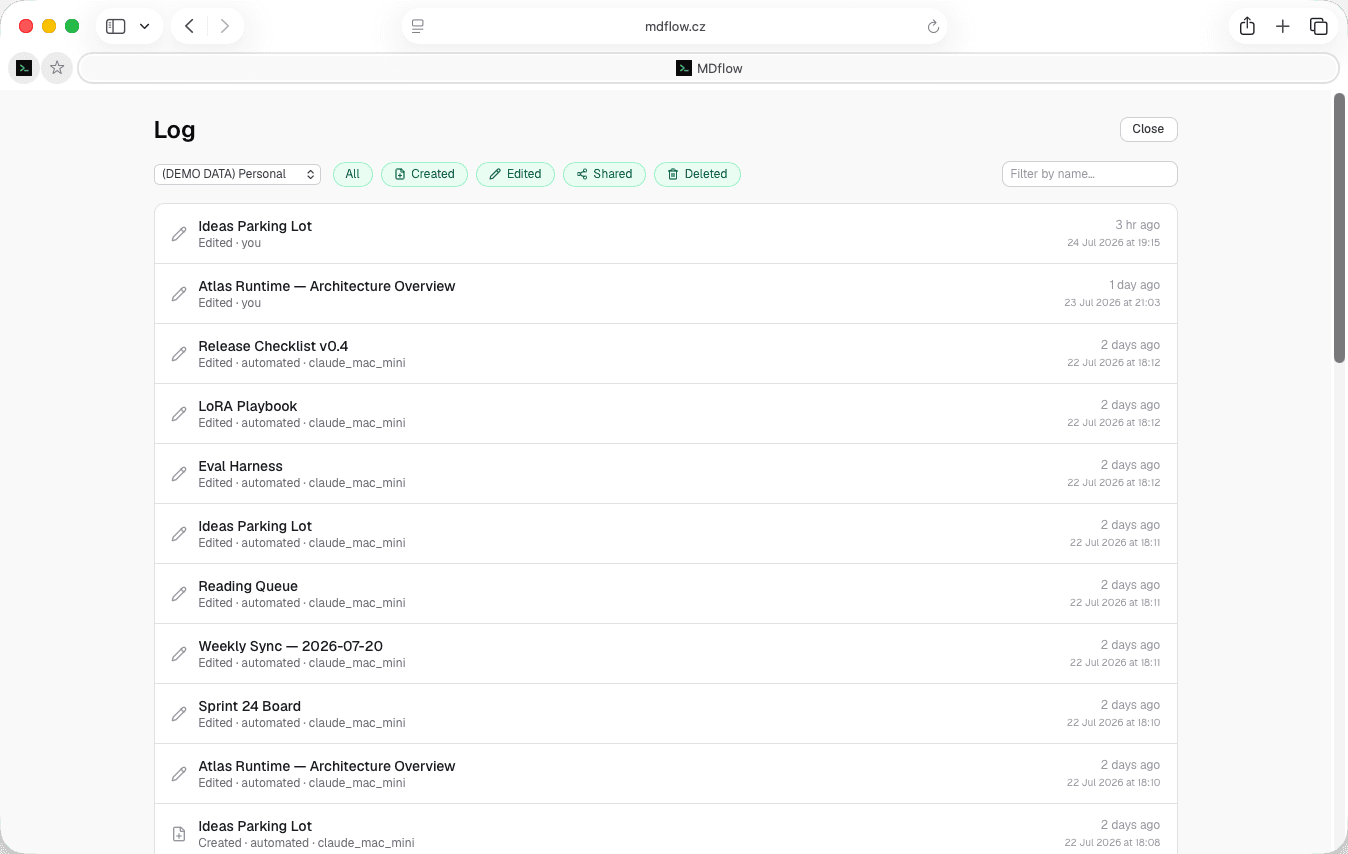
Letting software write into the place you keep what you know is a reasonable thing to be uneasy about. MDflow does not answer that with promises about model quality — it answers it by making every automated write visible, diffable and reversible, and access revocable in one click.
- Every automated write is logged. The Document Log at
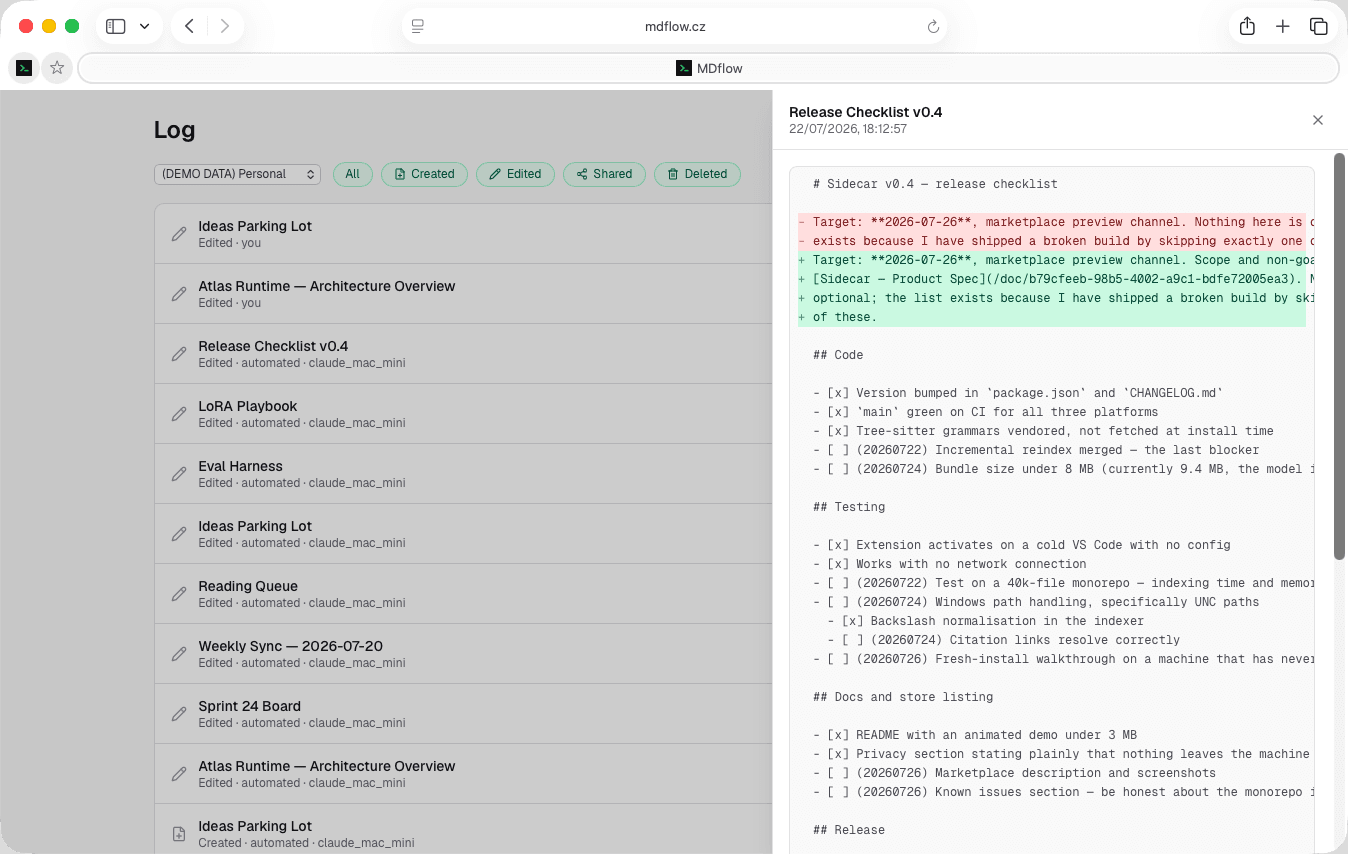
/logrecords created, edited, shared and deleted events, with the actor on every row —youfor browser actions,automated · <token name>for anything arriving over the API or MCP. Name your tokens and you can tell which agent did what. - Click any edit for the diff. An edited row opens a side-panel diff of exactly what that write changed, sourced from version history. You are never left guessing what an agent touched inside a long document.
- Restore, non-destructively. Version history captures the previous version on every save, whatever wrote it. “Set as latest version” brings an old one forward without discarding the current text — that becomes a history entry of its own, so undoing is never destructive either.
- An agent can't silently overwrite you. Saves are conflict-aware: a write only replaces the copy it was based on. If you edited the document in the browser meanwhile, the agent's write does not quietly win.
- Revoke instantly. Access is a Personal Access Token. Do not like what you are reading in the Log? Delete the token and that agent is out — no per-document cleanup, no waiting for a session to expire.
- Deletions leave a record. A deleted document keeps its who, what and when in the Log even though the document is gone — including documents removed indirectly by deleting a folder.
A small wiki that grew itself
What this looks like over a month, when it works.
- Week 1Four folders with descriptions:
Architecture decisions,Runbooks,Vendor notes,Meeting notes. Two documents in each, written by hand. The agent gets a token. - Week 2After each design discussion the agent drafts the decision record and files it in
Architecture decisions. You rewrite the first two — the third is close enough to keep. - Week 3A vendor changes their auth flow. The agent finds the two runbooks that mention it, updates both, and the Log shows two
automatededits. You diff them in about a minute. - Week 4
Meeting noteshas grown past browsing, so the agent splits it into subfolders by quarter. You publishRunbooksas a shared knowledgebase for the on-call rota.
Guardrails
The defaults that stop an ordinary mistake becoming an expensive one.
- Empty writes are refused. Replacing a body with an empty one requires an explicit
confirmEmpty=true. A truncated generation cannot blank a document by accident. - 500 KiB per document. A runaway write hits a ceiling rather than filling your workspace.
- Names are disambiguated. A document written into a folder that already has that name becomes
(2)rather than overwriting its namesake. - 60 requests per minute. A loop that goes wrong is throttled instead of running until it has rewritten everything.
What it doesn't do
Read this before you rely on the audit trail:
- Version history is Pro. Without it there is no diff to open and nothing to restore — which removes most of the safety net above.
- Free accounts see 24 hours of the Log. Events are recorded for everyone and kept 30 days, but only Pro can look back over the full retained history.
- No approval workflow. An agent's write lands immediately. Review is after the fact, in the Log — there is no queue of pending changes to accept.
- Token scope is the whole account. A Personal Access Token reaches every workspace. You cannot yet give an agent one folder and nothing else.
Questions
Is it safe to give an AI agent write access to my notes?
Can an agent wipe a document by accident?
How does the agent know where to file something?
What do I need to pay for?
Which agents can do this?
Will the agent read my encrypted documents?
Related
- Share context across agentsThe read half — connecting Claude, Cursor and Codex so they all see the same folders.
- KnowledgebasePublish what the agent has been maintaining, at a link with search and a homepage.
- The Karpathy-style wikiThe longer argument for a knowledge base your AI maintains, and how to start one.
Give it the filing. Keep the judgement.
Describe four folders, issue a named token, and read the Log for a week. If you do not like what you see there, deleting the token ends it — and every document it wrote is still ordinary markdown.
Agent write access and version history need Pro, from €4.99/mo. The Document Log records events on every plan; free accounts view the last 24 hours.